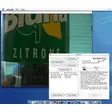
Download e3 Direct Mail – Free macOS Email Marketing Tool
Overview
e3 Direct Mail is a free, native macOS email marketing application created by e3 Software. Designed specifically for Apple computers, the tool gives small businesses, non‑profits, and solo entrepreneurs a powerful desktop client to build, send, and track professional‑looking email campaigns without a recurring subscription fee. While it does not boast the deep automation suites of cloud‑based platforms such as Constant Contact, e3 Direct Mail makes up for it with offline capability, tight integration with macOS utilities like Apple Photos, Apple Contacts, and the Notification Center, and a library of polished mail templates that can be customized with just a few clicks.
Users can import contact lists from Microsoft Excel, pull in design assets from Apple’s ecosystem, and even bring external HTML templates from Mail Designer, MailChimp, or Campaign Monitor. The application also includes a built‑in autoresponder, real‑time tracking, and the ability to schedule mailouts for special occasions. In short, e3 Direct Mail delivers the essential features of an email marketing platform in a secure, desktop‑first experience that works perfectly on Macs.
Features & Benefits
- Native macOS design – optimized for speed and stability on Apple hardware.
- Offline campaign creation – work on drafts without an internet connection.
- Apple ecosystem integration – pull images from Apple Photos and contacts from Apple Contacts.
- Excel import – quickly load large contact lists from Microsoft Excel files.
- Notification Center alerts – receive real‑time delivery and open‑rate updates.
- Professional templates – dozens of elegant, customizable designs with column, title, text, and table controls.
- HTML template import – bring in custom layouts from Mail Designer, MailChimp, Campaign Monitor, or any HTML source.
- Autoresponder engine – set up automatic replies for new subscribers with fully editable content.
- Scheduled mailouts – trigger campaigns on birthdays, holidays, or any date you define.
- Real‑time analytics – track opens, clicks, and bounces directly within the app.
These features translate into tangible benefits for users. Because the app runs locally, you avoid the latency and privacy concerns that sometimes accompany cloud services. The seamless Apple integration reduces the time spent hunting for assets, while the straightforward template editor lets even non‑designers produce eye‑catching newsletters. Although e3 Direct Mail lacks advanced drip‑campaign builders, its core functionalities—contact management, campaign design, sending, and reporting—cover everything a small‑scale marketer needs to stay in touch with an audience.
Another noteworthy advantage is cost. e3 Direct Mail is completely free to download and use, with no hidden subscription fees. This makes it an attractive entry point for startups or community groups that need a reliable email tool but cannot afford premium SaaS platforms. The lack of a monthly bill also means you retain full ownership of your subscriber data, stored locally on your Mac, which can be an important compliance consideration for GDPR‑aware organizations.
Installation & Usage Instructions
Getting started with e3 Direct Mail is intentionally simple. Follow these steps to install and launch your first campaign:
- Download the installer: Visit the official e3 Software website and click the “Download for macOS” button. The file is a signed .dmg package, ensuring a secure installation.
- Open the .dmg: Drag the e3 Direct Mail icon into your Applications folder. macOS may prompt you to confirm that you trust the developer; click “Open” to proceed.
- Launch the app: Find e3 Direct Mail in your Applications folder or via Spotlight, then double‑click to open. The first‑time launch will ask for permission to access your Contacts, Photos, and Notification Center—grant these for full functionality.
- Set up your account: Although the tool is free, you’ll need to configure your sending email address. Enter your SMTP server details (most major providers like Gmail, Outlook, and iCloud are supported) and verify the connection.
- Import contacts: Choose “Import Contacts” from the sidebar, then select an Excel (.xlsx) file or a CSV export from Apple Contacts. Map the columns (e.g., First Name, Last Name, Email) and confirm the import.
- Create a campaign: Click “New Campaign,” pick a template from the library, and customize the text, images, and layout. Use the drag‑and‑drop editor to rearrange columns or insert tables.
- Set up an autoresponder (optional): Navigate to the Autoresponder tab, enable it, and design the automatic reply that new subscribers will receive.
- Schedule or send: Choose “Send Now” for immediate delivery, or pick “Schedule” to define a future date and time. The app will queue the messages and send them through your SMTP server.
- Track results: After sending, switch to the “Analytics” view. Here you’ll see open rates, click‑through percentages, and bounce information in real time, with desktop notifications for critical events.
Because the software operates offline, you can compose and design your email even when you’re on a plane or in a coffee shop without Wi‑Fi. Once you reconnect, the app automatically syncs your scheduled sends and updates the analytics dashboard.
For power users, e3 Direct Mail also supports importing custom HTML templates. Simply choose “Import HTML” from the template selector and paste your code or point to a local file. This flexibility ensures that branding guidelines can be adhered to without sacrificing the convenience of a native Mac app.
Compatibility, Pros & Cons
macOS 10.13 (High Sierra) or later
Pros
- Completely free with no subscription fees.
- Native macOS performance—fast, stable, and fully integrated with Apple services.
- Offline campaign creation and scheduling.
- Elegant, ready‑to‑use templates that are easy to customize.
- Direct import from Excel and Apple Contacts simplifies list management.
- Real‑time analytics and Notification Center alerts keep you informed.
- Autoresponder feature provides basic automation without extra cost.
- Secure, local storage of subscriber data.
Cons
- Lacks advanced automation (drip campaigns, behavioral triggers) found in cloud platforms.
- No native Windows or Linux version—collaboration across mixed‑OS teams is limited.
- Template editor is basic; complex design changes require HTML knowledge.
- No built‑in A/B testing or advanced segmentation tools.
- Relies on external SMTP servers, which may require additional configuration.
Overall, e3 Direct Mail shines for users who value a secure, offline‑first experience on macOS and who do not need the deep marketing automation suites of enterprise‑grade SaaS solutions. The trade‑off is a more manual workflow and limited cross‑platform collaboration, but for many small businesses, freelancers, and nonprofit teams, the pros far outweigh the cons.
FAQ & Final Thoughts
Is e3 Direct Mail really free or are there hidden costs?
e3 Direct Mail is completely free to download and use. There are no subscription fees or premium tiers. The only potential cost is the SMTP server you choose for sending mail, which may have its own pricing model (e.g., Gmail or Outlook). All core features, including templates, autoresponder, and analytics, are available at no charge.
Can I use e3 Direct Mail on Windows or Linux machines?
No. e3 Direct Mail is a native macOS application and requires macOS 10.13 or later. Windows or Linux users will need to run the app on a Mac or use a virtual machine. This limitation also means team collaboration across different operating systems is not as seamless as with cloud‑based services.
How does the autoresponder work without a cloud service?
The autoresponder is built into the desktop client. When a new subscriber is added to your list (for example, via a sign‑up form linked to your website), e3 Direct Mail automatically sends the predefined reply using your configured SMTP server. All settings and the email template are stored locally, ensuring the response is sent even if you’re offline at the moment of subscription.
Can I import templates from other email services?
Yes. e3 Direct Mail allows you to import HTML templates from Mail Designer, MailChimp, Campaign Monitor, or any custom HTML file. Once imported, you can edit the basic layout (columns, text, tables) directly within the app.
Is my subscriber data safe when using a desktop‑only app?
Because all data is stored locally on your Mac, you retain full control over your contact lists. This eliminates the risk of third‑party data breaches associated with cloud storage. However, it also means you’re responsible for regular backups (e.g., using Time Machine) to protect against hardware failure.
In conclusion, e3 Direct Mail stands out as a reliable, free email marketing solution for macOS users who value offline capability, native Apple integration, and a straightforward design experience. While it doesn’t replace full‑scale automation platforms, its core features—professional templates, easy contact imports, real‑time tracking, and an autoresponder—are more than sufficient for small businesses, freelancers, and nonprofit organizations. If you’re looking for a cost‑effective way to launch polished email campaigns without a monthly fee, downloading e3 Direct Mail today is a smart move.
Ready to boost your email outreach? Download e3 Direct Mail now and start crafting beautiful newsletters on your Mac—completely free and secure.